Build or Buy? When Off-the-Shelf Software Is Enough for Your Business
Ready-made software or a custom web app? Signs that buying is enough, signs it isn't, what each really costs, and how to test before you commit.
A developer who tells you to build custom software every time isn’t giving advice, they’re selling. Most of the time, ready-made software is the right answer, and you should start there. But for some businesses it isn’t, and those owners spend years bending their work around a tool that was never made for it.
This guide helps you tell which one you are. It covers when buying is enough, the signs it isn’t, what each route really costs, and a simple way to test before you commit to either.
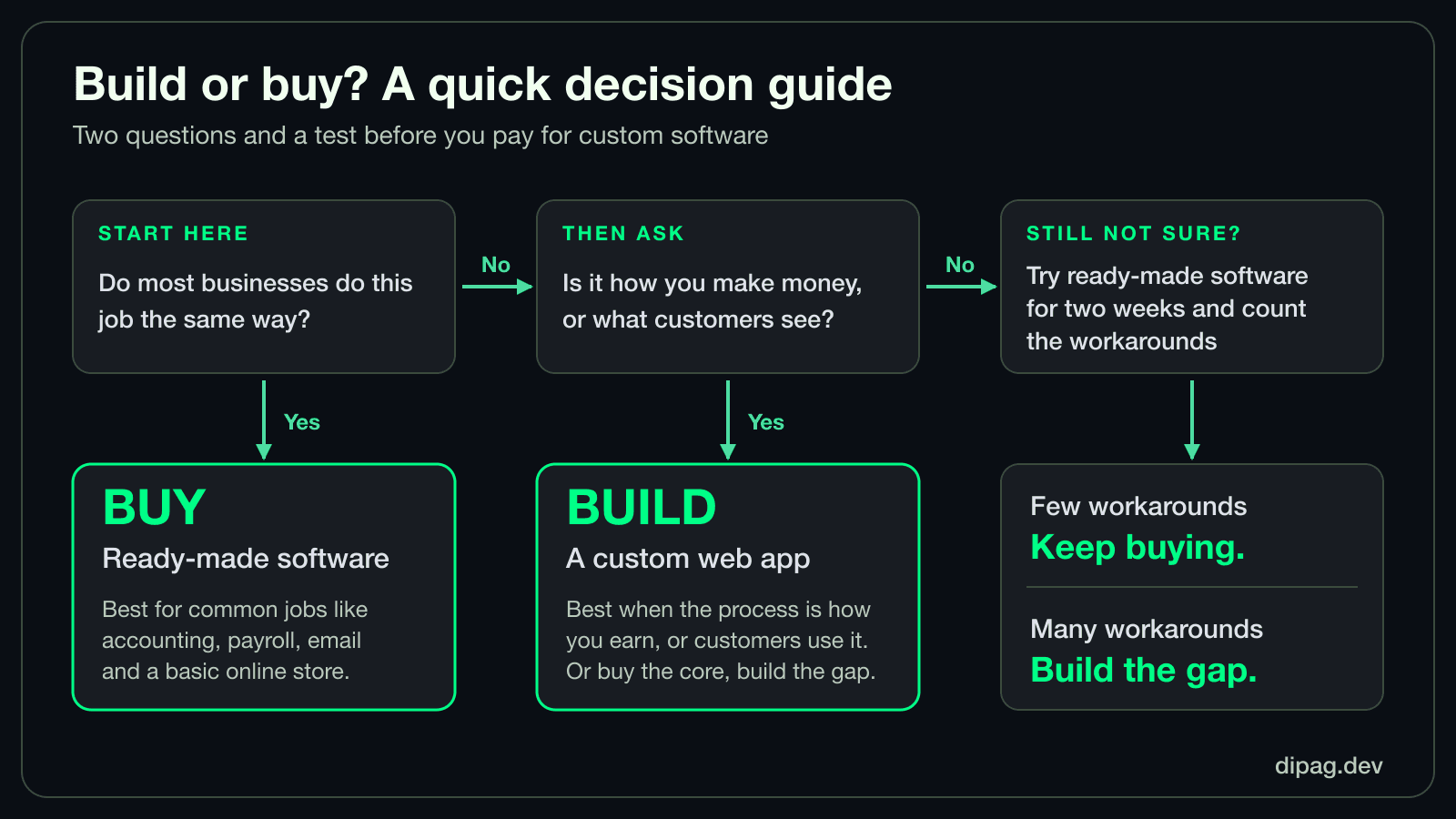
Why buying first is usually right
Ready-made software has a head start you can’t match with a new build. Thousands of businesses have already shaken out its bugs, and a team keeps it updated, secure and working with other tools. You can start using it this week, and if it’s a poor fit you can leave, which costs far less than a failed build.
For anything that works the same way in most businesses, such as bookkeeping, payroll, email marketing, a basic online store or a help desk, building your own rarely makes sense. You’d pay to rebuild something that already exists, then keep paying to maintain it.
Signs that off-the-shelf is enough
- Your process looks like most others in your industry. The tool was designed around how businesses like yours already work.
- You can adapt your process to the tool without losing anything that matters. Changing a form or a step is fine. Changing how you make money isn’t.
- The settings cover your rules. Your pricing, roles and notifications fit inside what the tool offers.
- You can get your data out. If you can export everything, leaving later stays an option.
- The monthly cost is small next to the time it saves. That includes the cost at the team size you’ll have next year.
Signs it isn’t
One gap isn’t a reason to build. A pattern is. Watch for these:
- Workarounds everywhere. A second spreadsheet to track what the tool can’t, copy-pasting between two systems, or a note on the wall that explains how to trick the software.
- The tool shapes your offer. You’ve stopped selling something because the software can’t handle it, such as a pricing rule, a package or a booking type.
- You’re paying for a lot you don’t use. You need two features out of forty, and the price follows the forty.
- Your customers need their own branded experience. A portal, booking page or account area that looks and behaves like your business, not a vendor’s.
- Several tools must agree and don’t. Orders, stock and payments live in different places and someone reconciles them by hand.
- It’s the core of how you earn. If the process is your edge, renting the same process as your competitors rarely helps you stand apart.
Side by side
| Question | Points to buying | Points to building |
|---|---|---|
| How common is the job? | Most businesses do it the same way | It’s specific to how you operate |
| How many workarounds? | One or two small ones | Several, and growing |
| Do you need it soon? | Yes, and it must start this month | You can plan a staged build |
| Does the customer see it? | Only through emails or receipts | It’s a branded part of your service |
| Is it a competitive edge? | No, it’s back-office | Yes, it’s how you stand out |
| Cost as you grow | Per-user fees stay manageable | Per-user fees or limits would climb fast |
What each route really costs
Both routes cost money, just in different places, so compare them over a few years instead of on the first invoice.
Buying
- Subscriptions, often charged per user, which grows as your team does.
- Time lost to workarounds. It’s hard to see on a bill but easy to feel in a week.
- Add-ons and upgrades you pay for to unlock one needed feature.
- Lock-in. The more your data and habits live inside one tool, the harder it is to leave.
Building
- The build itself, which depends on scope more than anything. We explain the drivers in what decides the cost of a custom web app.
- Running costs: hosting, payment gateway fees and messaging.
- Maintenance: updates, security fixes and the changes you’ll want once people use it.
- Your time, spent describing how the business works, and testing.
The middle path: buy the core, build the gap
The choice is rarely all or nothing. Three combinations come up often:
- Buy the platform, add a small custom piece. A Shopify store with one custom feature, for example. We cover when that makes sense in Shopify custom app vs app store app.
- Connect your tools instead of replacing them. A no-code connector handles light, low-volume jobs, and a custom integration is worth it when volume or reliability matters. See Zapier vs a custom integration.
- Start bought, replace later. Use ready-made software while you learn what you really need. Once the gaps are clear, you have a precise list to build from, which makes a custom build cheaper and safer. If you’re leaving spreadsheets, see moving from spreadsheets to a custom web app.
How to test before you decide
You can learn more in two weeks of real use than in a month of comparing feature lists.
- Write your must-do workflows. Three to five jobs the tool has to handle, such as “a customer books and pays” or “a manager approves a request”.
- Run real work through a free trial, not the vendor’s sample data.
- Note every workaround. Each one is a cost. Count them at the end.
- Check the questions below before you move any real data in.
What it looks like in practice
A sports venue that wants online court bookings can often start on a ready-made booking platform and be taking bookings quickly. (We run one ourselves, Bisogo, so we’re not neutral, but we’d tell a venue the same thing.) A venue that wants its own brand, its own domain and pricing rules built around how it runs its courts is the one that benefits from building. Both are sensible. They just answer different needs. Our pickleball court booking page lays out both routes.
When you’ve tried buying and still have gaps
If you’ve run the test and the workarounds keep piling up, that list is the start of your scope. Write the gaps as a one-page scope, as described in our guide to what decides the cost of a custom web app, and you’ll get quotes you can compare fairly. To talk it through, see our custom web app development service. We’ll say so honestly if ready-made software would serve you better.